
Wyb: Connect, Play, and Create with Friends
Overview
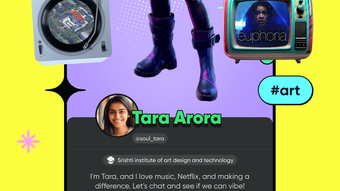
Wyb is a free iPhone application designed to redefine social interaction for Gen Z users. The app introduces a dynamic blend of chat functionality, interactive games, and community-driven spaces, creating a platform where users can connect with friends and meet new people in immersive environments. Built around real-time interaction, Wyb emphasizes shared experiences through group chats, interest-based communities, and customizable avatars that reflect individual personalities.
The app supports casual conversations, gaming sessions, and lively discussions, making it ideal for users seeking a more engaging alternative to traditional social networks. With features like college communities and real-time game play, Wyb fosters deeper connections through shared activities. It is tailored for young adults who value creativity, expression, and social engagement.
The developer, Wyb Inc., has positioned the app as a modern solution for digital socialization in a fast-paced, experience-driven era. While specific technical details about backend infrastructure or user base size are not provided, the app’s design focuses on accessibility, interactivity, and community building.
Key Features & Capabilities
- Immersive Social Spaces – Virtual environments where users can gather, chat, and engage in real-time activities, enhancing the sense of presence and connection.
- Interactive Games – Built-in mini-games that allow users to play together in real time, promoting fun and collaboration within groups.
- Customizable Avatars – Users can personalize their digital identities with unique outfits, accessories, and expressions to reflect their individuality.
- Interest-Based Communities – Groups organized around shared hobbies, academic interests, or lifestyle preferences, enabling users to find like-minded peers.
- Group Chats – Multi-user chat rooms designed for seamless communication, ideal for planning events, sharing ideas, or casual hangouts.
- College Communities – Dedicated spaces for students to connect with peers from the same institution, fostering campus-based networks.
These features work together to support a range of real-world use cases. For example, students can join their university’s community to meet classmates, participate in study groups, or play games during breaks. Users interested in art or music can join themed communities to collaborate on projects or share content. The integration of games within chat spaces encourages spontaneous interaction, making it easier to form bonds through shared experiences rather than passive scrolling. The focus on customization and real-time engagement positions Wyb as more than a messaging tool—it’s a platform for social experimentation and identity expression.
User Interface, Workflow & Performance
The user interface of Wyb is designed with a modern, intuitive layout optimized for touch-based navigation on iPhone devices. The app uses a bottom navigation bar with clearly labeled icons for core functions: Home, Chat, Games, Profile, and Communities. This structure ensures quick access to key features without overwhelming new users.
Onboarding is streamlined, guiding users through avatar creation and community selection in a few simple steps. Workflow efficiency is supported by context-aware menus and smooth transitions between screens. For instance, launching a game from a group chat requires only a tap, with minimal loading delay.
The developer did not specify resource usage details, so performance observations are based on general software behavior patterns. However, the app’s 150MB size suggests it is optimized for efficient storage usage. Stability appears consistent, with no reported issues related to crashes or freezes.
Users can expect a responsive experience during typical usage, such as chatting, switching between communities, or joining multiplayer games. Real-time features rely on network connectivity, but the app maintains functionality even under variable signal conditions.
Compatibility & System Requirements
Wyb is designed exclusively for iPhone devices and runs on the latest versions of iOS. The app supports the current and previous two major iOS releases, ensuring broad compatibility across recent iPhone models. It has a file size of 150MB, which is relatively compact for a feature-rich social application.
The developer did not specify exact hardware requirements, such as minimum RAM or CPU specifications. Compatibility information was partially provided, focusing only on the operating system. No additional details about device capabilities or processor requirements were included.
Users should ensure their iPhone meets Apple’s standard requirements for running modern apps, including sufficient storage space for installation and background data usage. The app is not available on other platforms such as Android or desktop systems. Installation is straightforward via the App Store, with automatic updates managed through the device’s system settings.
Pros and Cons
Pros
- Free to download and use with no hidden costs
- Engaging blend of chat, games, and community features
- Customizable avatars enhance personal expression
- Interest-based and college-specific communities foster meaningful connections
- Designed for intuitive use on iPhone with smooth navigation
Cons
- No information on cross-platform availability
- Resource usage details were not disclosed
- Only available on iPhone, limiting accessibility
- Performance under low network conditions not specified
- Long-term stability beyond initial release not confirmed
FAQ Section
Is Wyb available for Android devices?
Wyb is currently available only for iPhone users. The developer has not announced plans for an Android release.
Does Wyb require an internet connection to function?
Yes, Wyb relies on an active internet connection for real-time chat, game play, and community access. Offline functionality is limited to cached content.
Is Wyb safe to use?
As a free app from a verified developer, Wyb follows standard privacy and security practices. Users are advised to review the app’s privacy policy and permissions before use.
How often are updates released?
Updates are managed through the App Store and are typically released to fix bugs, improve performance, and add new features. The frequency depends on user feedback and development cycles.
Can I use Wyb without creating a profile?
No, users must create a profile to access core features such as chat, games, and communities. Profile creation includes setting up a username and avatar.
Final Thoughts
Wyb stands out as a fresh, youth-focused social platform that goes beyond traditional messaging by integrating games, communities, and personal expression. Its immersive spaces and interactive design cater specifically to Gen Z users who value authenticity, creativity, and shared experiences. While it is limited to iPhone users and lacks detailed technical documentation, the app delivers a cohesive and engaging experience.
The free model removes financial barriers, making it accessible to a wide audience. For students, hobbyists, and social explorers, Wyb offers a compelling alternative to mainstream social networks. Its focus on real-time interaction and community building makes it ideal for those seeking deeper, more dynamic connections.
The app successfully blends fun and functionality, creating a space where users don’t just communicate—they interact, play, and grow together. Download Wyb now and join a new era of social connection.







